
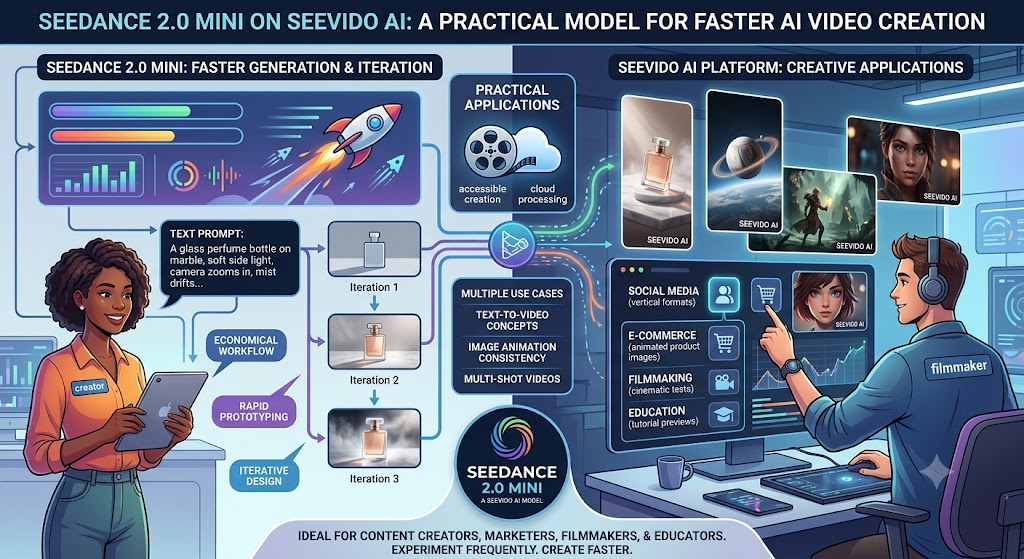
AI video generation is becoming increasingly useful for content creators, marketers, online sellers, filmmakers, educators, and small creative teams. Instead of relying entirely on traditional filming, manual animation, or complicated editing software, users can now turn written prompts and visual references into short video clips. For creators who want to experiment frequently without making every generation a major production decision, Seedance 2.0 Mini offers a practical and accessible workflow on SeeVido AI.
The value of a Mini model is not limited to its lighter positioning. Its real advantage is how naturally it fits into an iterative creative process. AI-generated video often requires several attempts before the motion, framing, pacing, and visual style feel right. Creators may need to revise a prompt, simplify an action, adjust the camera direction, or compare multiple versions of the same idea.
A more economical model makes this experimentation easier. Rather than treating every output as a finished video, users can generate drafts, identify the strongest direction, and refine the concept step by step.
Why Seedance 2.0 Mini Is Useful for Creators
Many creative projects begin with an uncertain idea. A marketer may know which product to promote but remain unsure about the visual approach. A filmmaker may want to preview a scene before developing a storyboard. A social media creator may need several opening hooks before choosing the most engaging one.
Seedance 2.0 Mini can support this early stage of development. Users can describe a subject, setting, action, mood, and camera movement, then review how those elements appear in motion. The generated clip can serve as a creative test, visual reference, campaign draft, or starting point for further editing.
This approach is valuable because it encourages exploration. A creator can test a clean studio shot, a cinematic outdoor setting, and a casual user-generated-content style without arranging three separate video shoots. The resulting clips can help the creator decide which concept is worth developing further.
Turn Text Prompts into Short Video Concepts
Text-to-video generation allows users to begin with a written description. A basic prompt may identify only the subject and action, while a more effective prompt also explains the environment, lighting, camera behavior, mood, and ending.
For example, “a bottle on a table” gives the model very little direction. A stronger version could describe a glass perfume bottle resting on dark marble, illuminated by warm side lighting as the camera slowly moves closer and mist drifts through the background.
The second prompt provides a clearer production-style brief. It explains what should appear, how the scene should move, and what atmosphere the video should create.
Creators should generally focus on one primary subject and one understandable action. Trying to combine too many movements, locations, and scene changes in a short generation can make the result less coherent. Simple ideas are often easier to direct and refine.
Animate Images with More Visual Consistency
Image-to-video generation is useful when creators already have a product photo, character design, portrait, illustration, or campaign visual. The source image gives the model a stronger visual foundation than text alone.
A seller might animate a product image with a slow camera orbit and subtle lighting changes. An artist might add environmental movement to a fantasy illustration. A social media creator could turn a portrait into a short atmospheric clip with gentle camera motion.
Reference-based workflows can also help preserve important visual details. However, the source material should be selected carefully. Images with a clear subject, readable composition, and consistent lighting usually provide a better starting point than crowded or low-quality inputs.
The motion prompt should complement the image rather than contradict it. If the subject is shown in a close-up portrait, subtle facial movement or a slow push-in may work better than an elaborate full-body action that is not visible in the original composition.
Explore Multi-Shot Video Ideas
Short videos often benefit from a simple sense of progression. Instead of presenting only one disconnected moment, a creator may want an establishing view, a closer detail, and a final reveal.
Seedance 2.0 Mini can be used to explore multi-shot concepts when the prompt clearly describes the intended sequence. A product video, for example, might begin with a wide studio shot, move toward a close-up of the packaging, and end with the product positioned beneath a focused light.
To improve continuity, the prompt should keep the main subject, setting, lighting, and visual style consistent across the sequence. Introducing unrelated objects or sudden environmental changes may make it more difficult for the output to feel unified.
Creators can also test separate, focused versions instead of forcing every idea into one video. One generation might explore the opening shot, while another tests the final product reveal. These drafts can later guide editing or a more polished production.
Useful for Social Media and Marketing
Seedance 2.0 Mini is well suited to short-form content workflows. TikTok, Instagram Reels, YouTube Shorts, and similar platforms reward strong visual hooks, concise storytelling, and frequent publishing.
Creators can use the model to explore vertical video concepts, promotional clips, lifestyle scenes, tutorial previews, travel moments, food visuals, and user-generated-style advertising drafts. Marketing teams can also test several campaign directions before selecting one for further development.
For e-commerce, an existing product image can become the basis for a short promotional animation. For education, a lesson idea or tutorial outline can be turned into a visual preview. For independent filmmakers, the model can help communicate tone, framing, and movement before a scene is produced traditionally.
AI-generated content should still be reviewed carefully. Creators should check subject consistency, object details, movement quality, text, branding, and whether the output meets the requirements of the platform on which it will be published.
Why Try Seedance 2.0 Mini on SeeVido AI?
SeeVido AI provides a browser-based environment where creators can focus on prompts, references, settings, and generated results without first constructing a technical workflow.
This accessibility is useful for beginners who are still learning how AI video prompting works. It can also help experienced creators who need a quick way to develop visual drafts and compare multiple ideas.
Direct experimentation is important because the usefulness of any AI video model depends on the project. A cinematic landscape, product advertisement, character scene, educational clip, and casual social video may each require a different prompt structure. Testing personal ideas is the most reliable way to understand how the model fits a particular workflow.
Final Thoughts
Seedance 2.0 Mini is a practical option for creators who want frequent AI video experimentation, prompt-based generation, image animation, and short-form storytelling. It can support social media content, marketing drafts, product videos, educational previews, cinematic ideas, and everyday creative testing.
Its greatest advantage is the flexibility it gives users during the early stages of production. Creators can generate several directions, compare the results, improve their prompts, and move forward with a clearer visual plan.
For users who want to explore AI video creation without making the process unnecessarily complicated, Seedance 2.0 Mini on SeeVido AI provides an accessible place to begin.