
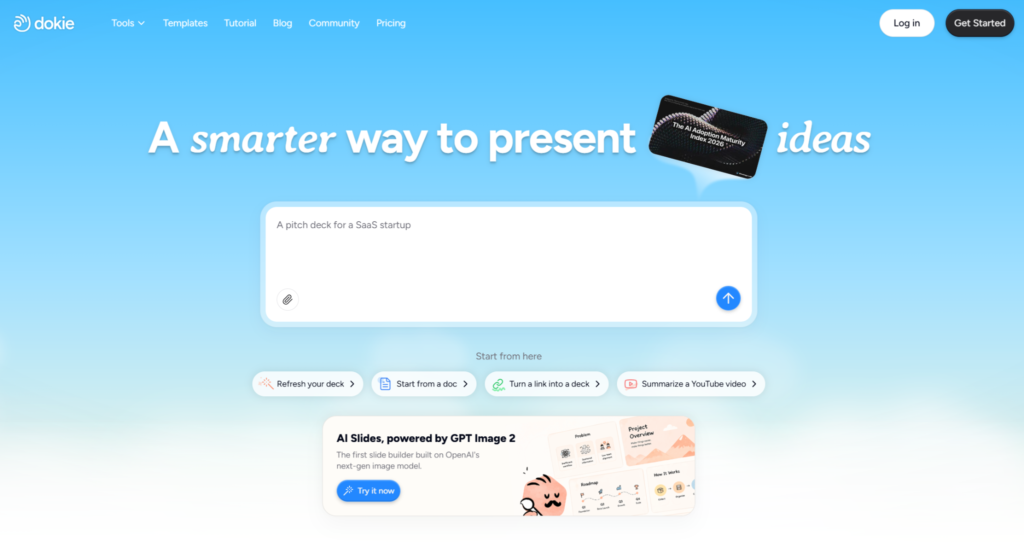
What Is Dokie?
Dokie is an AI presentation maker designed to help users create professional, brand-aligned slide decks faster. It can turn ideas, documents, URLs, notes, templates, and reference materials into structured presentations with clean layouts and editable content.
Its biggest advantage is not only that it generates slides. Many tools can create a first draft. Dokie’s stronger value is that users can keep refining the deck after generation.
Through a chat-driven editing workflow, users can describe what they want to change. They can ask Dokie to adjust layouts, simplify slides, add timelines, insert icons, change visuals, apply a style direction, or clean up formatting.
This makes Dokie useful for business decks, sales presentations, marketing reports, client proposals, pitch decks, executive updates, training materials, classroom slides, and team presentations.
For teams that constantly need slide revisions, Dokie can feel less like a one-click generator and more like an AI presentation assistant.
Why This Question Matters
Every corporate team knows the slide bottleneck.
Sales needs a client deck by tomorrow.
Marketing needs the product deck updated.
Leadership wants the executive summary shortened.
Product wants the technical section corrected.
Finance wants the numbers changed.
Brand wants the formatting cleaned up.
Someone wants the deck to “look more polished.”
Usually, all of this ends up with the in-house slide designer, brand designer, marketing designer, or the one person on the team who is “good at PowerPoint.”
That creates a workflow problem. Designers spend too much time on production tasks and not enough time on high-value creative work.
The question is not only whether AI can make slides.
The real question is whether AI can reduce the slide revision burden enough to change how teams use design resources.
That is where Dokie becomes interesting.
The Real Role of an In-House Slide Designer
To answer whether Dokie can replace a slide designer, we need to define what a slide designer actually does.
A good in-house slide designer does not simply make slides “look nice.” They often handle:
Visual hierarchy
Layout structure
Brand consistency
Executive storytelling
Data visualization
Template systems
Information design
Presentation flow
Audience adaptation
Final polish
Design quality control
They also understand company context. They know which layouts leadership prefers, how the brand team interprets guidelines, what sales decks need, and how internal stakeholders give feedback.
That experience is difficult to replace completely.
However, not every task given to a designer requires that level of expertise. Many requests are routine:
Fix the spacing.
Make this slide cleaner.
Turn this into a timeline.
Match the template.
Replace this icon.
Reduce the text.
Make the title stronger.
Apply the brand style.
Clean up this deck before the meeting.
These are exactly the tasks where Dokie can help.
What Dokie Can Replace
Dokie can replace a meaningful amount of repetitive slide production.
It can help with layout cleanup, slide restructuring, formatting consistency, basic visual improvements, text simplification, template alignment, and targeted revisions.
For example, instead of asking a designer to manually turn a bullet list into a process slide, a user can ask Dokie to do it. Instead of asking someone to clean up spacing across a deck, a user can ask Dokie to improve formatting consistency. Instead of sending a slide to a designer because it feels too dense, a user can ask Dokie to simplify it and improve hierarchy.
This does not mean the output should never be reviewed. But it does mean many simple design requests can be handled earlier in the workflow.
That is a real shift.
Dokie can reduce the number of low-level slide tickets that reach the design team.
What Dokie Cannot Fully Replace
Dokie does not fully replace high-level design judgment.
For high-stakes decks, a human designer still matters. This is especially true for investor presentations, major client pitches, enterprise brand campaigns, conference keynotes, board decks, and complex data storytelling.
A designer can understand nuance that AI may miss:
Is this visual appropriate for the audience?
Does the story build tension correctly?
Is the slide too safe or too bold?
Does this layout match the company’s real brand maturity?
Will leadership approve this direction?
Is the design memorable enough for a major pitch?
Does this chart communicate the right takeaway?
Should this deck feel premium, technical, friendly, urgent, or authoritative?
These are not just formatting questions. They are communication and brand strategy questions.
Dokie can help create and revise slides, but it should not be treated as the final creative director for every presentation.
The Better Framing: Replacement vs. Leverage
The wrong question is: “Will Dokie replace our slide designer?”
The better question is: “How much more valuable can our designer become if Dokie handles the repetitive work?”
In most companies, designers are overloaded because every presentation request becomes a design request. But many of those requests are not true design problems. They are production problems.
Dokie helps move routine production closer to the business user.
A marketer can clean up a campaign report.
A sales rep can customize a client deck.
A product manager can turn dense notes into clearer slides.
A founder can create a pitch draft.
A teacher or trainer can update lesson materials.
The designer can then focus on the slides that actually need expert judgment.
This makes Dokie less of a replacement and more of a leverage tool.
How Dokie’s Chat Canvas Changes the Workflow
The chat canvas changes the slide workflow because users can edit based on intent.
In traditional slide tools, users need to know the mechanics. They need to move objects, resize text boxes, choose layouts, fix alignment, adjust font sizes, and manually maintain spacing.
In Dokie, users can describe the outcome:
Make this slide more executive-friendly.
Turn this bullet list into a process slide.
Make the deck match the uploaded reference style.
Simplify this slide without changing the layout too much.
Add a timeline for the implementation plan.
Make this slide feel more polished and client-ready.
This matters because business users often know what is wrong with a slide, but they do not know how to fix it.
Dokie helps translate business intent into slide edits.
That is the core value of a chat canvas.
Before Dokie: Designer as Slide Fixer
Before AI slide tools, many teams used designers as slide fixers.
A typical workflow looked like this:
A business user creates a rough deck.
The deck looks inconsistent.
The user sends it to a designer.
The designer fixes layouts, titles, spacing, icons, images, and formatting.
Stakeholders add feedback.
The deck breaks again.
The designer fixes it again.
This workflow is inefficient because the designer becomes the cleanup layer for everyone else’s messy slide work.
It also creates delays. Teams wait for design support even when the request is simple.
Dokie changes this by giving business users a better first pass. They can generate cleaner slides, make their own revisions, and reduce the amount of cleanup needed before a designer sees the deck.
After Dokie: Designer as Creative Director
With Dokie, the designer’s role can shift.
Instead of fixing every bullet slide, the designer can focus on higher-value work:
Creating better brand templates
Defining slide systems
Reviewing high-stakes decks
Improving visual storytelling
Building reusable presentation patterns
Handling complex data visualization
Designing custom hero slides
Creating premium sales or investor materials
Setting quality standards for the team
This is a healthier design workflow.
Dokie does not remove design from the process. It moves basic production out of the designer’s queue so designers can focus on creative direction and quality control.
That is why the tool is more likely to change the role of in-house designers than eliminate it completely.
Designer Workload Before and After Dokie
| Slide Task | Before Dokie | With Dokie |
| First draft creation | Often built manually or assembled from old decks | AI can generate a structured draft from source content |
| Bullet cleanup | Designer or PowerPoint-heavy user rewrites and reformats | User can ask Dokie to simplify and restructure |
| Layout changes | Manual slide rebuilding | Chat-based layout adjustment |
| Brand style matching | Designer checks and fixes inconsistencies | User can apply templates or reference styles earlier |
| Small visual edits | Designer replaces icons, images, and blocks | User can request targeted visual changes |
| Formatting cleanup | Manual spacing and alignment work | AI-assisted cleanup before final review |
| Stakeholder revisions | Repeated designer involvement | Business users can handle many rounds themselves |
| Final polish | Designer handles both production and quality | Designer focuses on high-value quality control |
| Creative direction | Often delayed by production workload | More time for strategic design decisions |
Where Dokie Saves Designers the Most Time
Dokie saves the most designer time on repetitive revision tasks.
These include:
Making slides less text-heavy
Cleaning up spacing
Improving layout balance
Turning bullets into visual structures
Creating timelines
Creating comparison slides
Matching a style reference
Fixing inconsistent formatting
Replacing generic visuals
Creating a cleaner first draft
These are important tasks, but they are not always the best use of a designer’s time.
When Dokie handles more of this work, designers can focus on moments where their judgment has the highest impact.
Where Designers Still Add the Most Value
Designers still add the most value when the deck needs strategic creative judgment.
For example, a major investor deck may need a custom narrative arc. A keynote may need memorable visuals. A premium sales deck may need custom design direction. A data-heavy report may need thoughtful visualization. A brand-sensitive executive deck may need final creative review.
Dokie can support these workflows, but it should not always own them end to end.
The best workflow is often collaborative:
Dokie creates the draft.
Business users refine the message.
Dokie handles layout and formatting revisions.
The designer reviews and improves high-impact slides.
The team finalizes the deck.
This workflow is faster than manual slide production and safer than fully automated design.
Dokie for Teams Without a Slide Designer
Dokie is especially useful for teams that do not have a dedicated slide designer.
Many startups, small marketing teams, sales teams, agencies, schools, and internal departments need polished decks but do not have design support for every request.
For these teams, Dokie can fill an important gap.
It helps users create decks that look more professional than manual DIY slides. It also reduces the need to rely on old templates, messy copied decks, or inconsistent formatting.
This does not mean every deck will look like it came from a senior designer. But it can raise the baseline quality significantly.
For teams without design support, that may be enough to change the workflow.
Dokie for Teams With In-House Designers
For teams with in-house designers, Dokie’s value is different.
It is not about replacing the designer. It is about reducing unnecessary design dependency.
A sales rep should not need a designer to fix every layout. A marketer should not need a designer to clean every report slide. A product manager should not need a designer to turn every feature list into a simple visual.
Dokie helps these users produce cleaner decks before design review.
That means designers receive better starting points and fewer low-level requests.
For in-house design teams, Dokie can function as a force multiplier.
Dokie for Sales Teams
Sales teams create and revise decks constantly.
They need client-specific versions, industry-specific examples, pricing slides, case studies, product comparisons, and proposal decks. Waiting for a designer for every revision slows the sales process.
Dokie helps sales teams make cleaner edits independently.
A sales rep can ask Dokie to make a slide more client-focused, turn a feature list into a benefits layout, add a timeline, or simplify a section for an executive audience.
This does not replace designer input for major sales assets. But it can reduce designer dependency for everyday client deck customization.
For sales teams, that speed matters.
Dokie for Marketing Teams
Marketing teams often sit between brand quality and business speed.
They need decks to look polished, but they also need to produce campaign reports, launch plans, client updates, content strategies, and sales enablement materials quickly.
Dokie helps marketers turn raw content into structured decks and then refine them without always waiting for design support.
This is especially useful when the team already has brand templates or reference styles. Dokie can help apply the style direction while allowing flexible edits.
For marketing teams, Dokie can reduce the gap between “good enough for internal use” and “polished enough to share.”
Dokie for Product Teams
Product teams often create slides that are accurate but too dense.
They may explain features, workflows, roadmaps, technical architecture, or release plans. The content is useful, but the slides may not be presentation-friendly.
Dokie can help product teams turn dense information into clearer layouts. A feature list can become a value comparison. A roadmap can become a timeline. A workflow can become a process diagram. A technical explanation can become a visual summary.
Designers may still need to review major product launch decks, but Dokie helps product teams create better drafts before that review.
Dokie for Executive and Strategy Teams
Executive and strategy teams need clarity.
They often work with dense information: performance results, market analysis, financial updates, team priorities, strategic recommendations, and board-style summaries.
Dokie helps these teams simplify content and improve structure. Users can ask for more concise slides, clearer hierarchy, stronger section flow, or executive-friendly summaries.
This is valuable because executives often do not need more design decoration. They need sharper communication.
Dokie helps create that sharper first pass.
The Risk: AI Can Create False Confidence
There is one important risk.
AI-generated slides can look polished enough that teams may skip proper review.
That is dangerous.
A deck can look clean and still have weak messaging, inaccurate claims, misleading charts, or poor strategic logic. A slide can look on-brand and still miss the audience’s real concern.
This is why in-house designers and business reviewers still matter.
Dokie should be used to accelerate creation and revision, not to remove judgment from the process.
Teams should still review:
Facts
Data
Claims
Tone
Audience fit
Brand compliance
Visual quality
Narrative flow
A polished-looking deck is not always a good deck.
The Best Workflow: AI First, Designer Later
The strongest workflow is not “AI instead of designer.”
It is “AI before designer.”
Dokie can help create a cleaner draft before the deck reaches the design team. That means the designer does not have to waste time fixing obvious problems. They can focus on the slides that matter most.
A practical workflow might look like this:
Business user gathers source content.
Dokie generates the first deck.
Business user refines structure and messaging through chat.
Dokie helps adjust layouts and formatting.
Team reviews the deck.
Designer reviews only high-impact slides or final quality.
Deck is finalized and delivered.
This workflow uses AI where it is strongest and human design where it matters most.
When Dokie Might Make a Designer Less Necessary
Dokie may make a designer less necessary for routine decks.
Examples include:
Internal updates
Simple sales decks
Training materials
School presentations
Marketing recaps
Team reports
Project summaries
Basic pitch drafts
First-round client proposals
For these use cases, Dokie may be enough to create a clean, professional deck without dedicated design support.
That is where the tool can genuinely change team resourcing.
The designer may not be needed for every deck anymore.
When You Still Need a Designer
You still need a designer for high-stakes or highly custom presentations.
Examples include:
Investor decks
Board presentations
Major client pitches
Conference keynotes
Brand launch decks
Premium sales materials
Complex data storytelling
Custom visual systems
Public-facing reports
Executive-level strategy narratives
These decks need more than clean formatting. They need taste, judgment, narrative design, and often custom visual direction.
Dokie can help start the process, but a designer can still elevate the final result.
Pros and Cons of Dokie’s Chat Canvas
Pros
Dokie helps non-designers create better slides.
It reduces repetitive slide production work.
It supports chat-based layout and content adjustments.
It helps users make targeted edits without full regeneration.
It can improve formatting consistency and visual hierarchy.
It supports brand-aligned workflows with templates and reference files.
It helps designers spend less time on low-value cleanup.
It is useful for sales, marketing, product, education, and corporate teams.
Cons
Dokie does not fully replace strategic design judgment.
High-stakes decks still need human review.
Complex brand systems may still require designer oversight.
Data-heavy slides may need manual checking and visualization expertise.
AI-generated slides can create false confidence if teams skip review.
Dokie is strongest as a workflow accelerator, not a complete design department replacement.
Is Dokie a Threat to Slide Designers?
Dokie is a threat to repetitive slide production, not to strong slide designers.
Designers who mainly spend time cleaning up formatting may feel their work changing. But designers who bring strategic thinking, storytelling, brand judgment, and custom visual design will remain valuable.
The future role of in-house slide designers may shift from production to direction.
They may create better templates, set standards, review high-stakes decks, and guide AI-assisted workflows.
That is not obsolescence. That is leverage.
Final Verdict
Dokie’s chat canvas will not make every in-house slide designer obsolete.
But it can make the old slide production workflow obsolete.
Teams should no longer need to send every minor formatting issue, layout change, or bullet cleanup request to a designer. With Dokie, many of those revisions can happen directly inside an AI-assisted presentation workflow.
That changes the designer’s role.
Instead of being the person who fixes every slide, the designer can become the person who defines quality, guides brand standards, and improves the most important decks.
For teams without design support, Dokie can raise the quality of everyday presentations.
For teams with in-house designers, Dokie can reduce low-value requests and free designers to focus on strategic creative work.
The honest verdict: Dokie does not replace great slide designers. It replaces the need to use great slide designers for every small slide fix.
That may be the more important disruption.
FAQs
Will Dokie replace in-house slide designers?
Dokie will not fully replace skilled in-house slide designers, but it can reduce the need for designers to handle repetitive slide production, formatting cleanup, and basic layout revisions.
What is Dokie’s chat canvas?
Dokie’s chat canvas allows users to create and revise slides through natural language instructions. Users can ask for layout changes, visual updates, formatting cleanup, and brand-aligned refinements.
Is Dokie good for non-designers?
Yes. Dokie is useful for non-designers because it helps them create cleaner, more professional presentations without manually designing every slide.
Can Dokie help professional designers?
Yes. Dokie can help designers by reducing repetitive production work and creating cleaner first drafts before final design review.
What slide tasks can Dokie automate?
Dokie can help with slide generation, layout changes, text simplification, formatting cleanup, visual updates, timeline creation, comparison slides, and brand style alignment.
What slide tasks still need a designer?
High-stakes storytelling, custom visual systems, complex data visualization, investor decks, keynote presentations, brand-sensitive decks, and final creative direction still benefit from a human designer.
Is Dokie better than hiring a slide designer?
For routine decks, Dokie may be enough. For high-stakes presentations, a skilled slide designer can still add significant value.
Can Dokie follow brand guidelines?
Dokie supports brand-aligned workflows using themes, templates, and reference files. However, final brand compliance should still be reviewed by the team.
Can Dokie reduce slide revision time?
Yes. Dokie can reduce revision time by allowing users to make targeted changes through chat instead of manually editing every slide element.
Is Dokie useful for sales teams?
Yes. Sales teams can use Dokie to customize client decks, improve value proposition slides, create comparisons, and make presentation revisions faster.
Is Dokie useful for marketing teams?
Yes. Marketing teams can use Dokie to create campaign decks, launch plans, client updates, reports, and sales enablement slides with less manual formatting work.
Is Dokie useful for product teams?
Yes. Product teams can use Dokie to turn dense feature notes, product workflows, and roadmap content into clearer presentation slides.
What is the biggest benefit of Dokie?
The biggest benefit is that Dokie reduces low-value slide production work. It helps users create and revise professional decks faster while preserving more time for strategic thinking.
What is Dokie’s biggest limitation?
Dokie’s biggest limitation is that it still requires human judgment. Users should review final decks for accuracy, strategy, brand fit, and audience relevance.
Should companies use Dokie with designers or instead of designers?
Most companies should use Dokie with designers. Dokie can handle routine slide work, while designers focus on brand quality, storytelling, and high-stakes presentation design.