
Mobile troubleshooting begins with an uncomfortable fact: the most important data is often noticed only when a device will not start. A backup made after the failure is not a backup. Creative teams face the same lesson when a deadline exposes missing versions, scattered assets, and unclear ownership.
Good AI Screenwriting Software should therefore be judged by recovery and continuity, not only by the quality of a generated paragraph. Writers need to know what the system changed, where the authoritative draft lives, and how work leaves the platform.
Map The Failure Before Choosing The Fix
On a phone, “my data is gone” may describe deletion, a broken screen, a failed update, a locked account, or a storage problem. Each cause demands a different response. Treating them as one issue can make recovery worse.
“The script is wrong” is equally vague. The line may be weak, the scene may contradict an earlier fact, the location view may be stale, or a collaborator may be reading an old export. A team should identify the failed layer before generating replacements.
Keep One Authoritative Document
Laper’s Script projects treat the screenplay as the source of truth. Scene headings derive scenes and location information. Character cues feed character entities. Planning objects such as beats, props, and shots live beside the draft without becoming competing copies of it.
This model reduces recovery work after a rushed revision. If a location changes, the team can correct the heading at its source and inspect the views that follow it. They do not have to compare several spreadsheets to decide which one contains the intended story.
The practice is simple enough to use outside any product: designate one draft as authoritative, label exports with purpose and date, and never let a chat response become an undocumented alternate version.
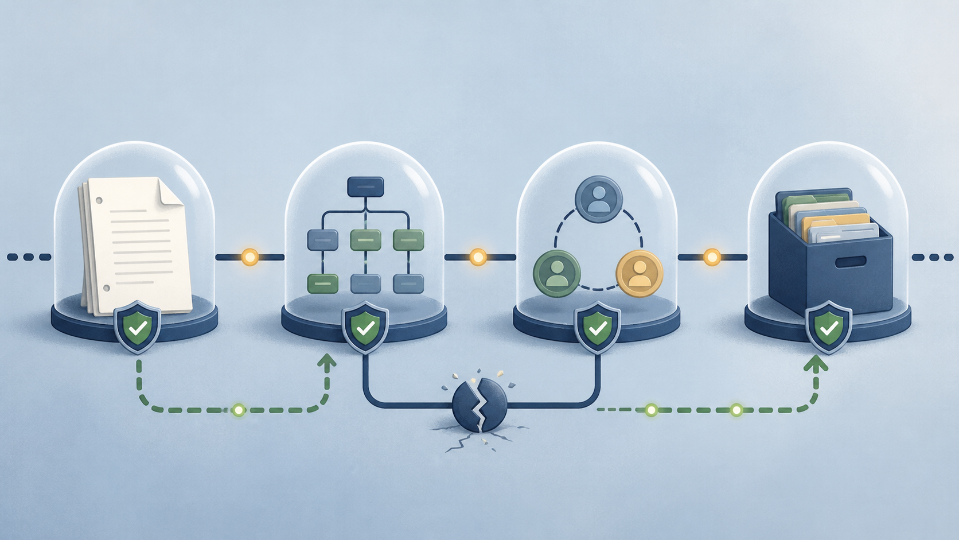
Use A Four-Layer Continuity Check
- Document: Can the current screenplay be opened, exported, and restored?
- Structure: Are scenes, characters, and locations still linked to the right source elements?
- Collaboration: Are participants editing the same project state with appropriate access?
- Assets: Can each visual output be traced to its scene, character, location, or prop?
A green check at one layer does not guarantee the others. A readable PDF may prove that the words survived while offering no editable structure. A folder of storyboard images may be intact while their shot order and scene context are lost.
Make Automated Changes Addressable
General AI chats encourage copying. Copying creates a new state outside the screenplay, then asks the writer to reconcile it manually. When several people do this at once, the apparent speed becomes a version-control problem.
Laper’s assistant can work from the current focus, outline, selected scene, range, node, or bounded full draft. Approved changes enter through screenplay operations. This keeps the proposal connected to an address in the project while leaving the writer free to reject it.
For teams considering AI for script writing, addressability is a stronger requirement than unlimited generation. A suggestion that identifies its target can be reviewed, reversed, and discussed. Detached prose has to be rediscovered before it can even be judged.
Back Up Relationships As Well As Files
Traditional backup advice focuses on copies: keep more than one, use separate locations, and test restoration. Creative projects need an additional rule—preserve relationships.
A character portrait should remain connected to the character it depicts. A location reference should identify the relevant location. A storyboard frame should retain its scene, shot order, and camera intent. Otherwise the files survive while the production meaning decays.
Laper routes generated images through tasks and project assets. Storyboards live within scene scope, and shots keep explicit order. This does not replace an external archive of approved deliverables. It gives that archive a better source because the project still explains why each asset exists.
Test Restoration Before The Deadline
A recovery plan is credible only after a small rehearsal. Export the screenplay as PDF for reading and FDX for structured exchange. Open both. Restore a saved version in a test project if the workflow permits. Confirm that a collaborator can find the current scene without asking for a private link buried in chat.
Also test the human procedure. Who decides whether to restore? Which approved export is the fallback if the service is unavailable? Which visual assets are final, and which are experiments? Clear answers prevent a technical hiccup from becoming an authorship dispute.
Prepare For Partial Failure
Real incidents are rarely all-or-nothing. One collaborator may lose connectivity while others continue. The editor may remain available while an image generation service queues slowly. A project may open even though a linked reference file has moved.
Write a fallback for each critical activity. If live collaboration is unavailable, freeze edits and nominate one person to record changes in a dated copy. If generation stalls, continue shot planning with text descriptions instead of repeatedly submitting the same task. If a reference disappears, mark the dependent scene rather than inventing a replacement fact.
Laper’s collaboration layer uses a Loro document and a server-first initial sync before the editor becomes writable. That safeguard is designed to establish current project state before new edits begin. Writers do not need to understand the synchronization machinery, but they should notice whether the interface is writable and avoid assuming an offline tab is current.
Distinguish Recovery From Repair
Recovery restores available data. Repair makes the restored project coherent. The distinction prevents a team from celebrating too early after opening an old file.
After restoration, compare scene count, the opening and closing line, character names, and location list with the last approved export. Then inspect the project areas most likely to contain authored information that cannot be re-derived from the page, such as beats, props, relationship notes, casting references, and shot choices.
Finally, review access. A restored copy shared from a personal account may exclude collaborators or expose material too broadly. Confirm the same read, comment, edit, and publication boundaries that applied before the incident.
A short incident note should record what failed, the last known good state, what was restored, what required manual repair, and what safeguard will change. Without that note, the team may reproduce the same failure at the next deadline.
Resilience Is A Creative Feature
Recovery planning may sound administrative, yet it protects the conditions in which creative choices remain meaningful. Writers can take risks when they know the previous state is recoverable. Collaborators can move faster when the current source is unambiguous.
The most reliable workflow keeps one authoritative screenplay, scopes automated changes, synchronizes collaborators, preserves asset relationships, and tests exports before they are urgently needed. Failure will still happen. It simply will not get to decide which version of the story survives.