
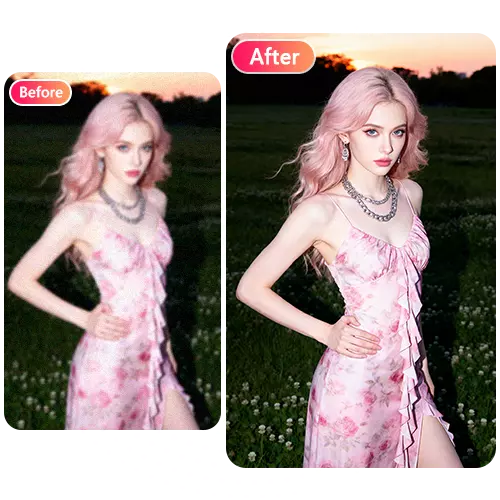
Artificial intelligence has completely changed the way people create and edit images. What used to take hours in professional software can now be done in seconds with the right AI-powered tool. Whether you are a social media creator, a small business owner, or someone who just wants to make their photos look better, AI image editing tools have made the process faster and more accessible than ever before. The demand for easy-to-use, no-cost platforms has grown rapidly, and several tools have stepped up to meet that need.
One platform that stands out in this space is EzMaker AI, a free online AI photo editor that requires no sign-up and no installation. It is a fully web-based platform that allows users to generate and edit images instantly using artificial intelligence. It supports text-to-image generation, image editing, background removal, style transformation, and image enhancement. Users can simply input prompts or upload images to create high-quality visuals without needing professional design skills or software. It is widely used for social media content creation, marketing materials, e-commerce product images, and creative design exploration.
What Makes EzMaker AI Different from Other Editors
There are many AI photo editors available online, but most of them come with limitations. Some require you to create an account before you can use even the basic features. Others offer a free tier but lock the most useful tools behind a paywall. EzMaker AI takes a different approach by offering unlimited access to premium features completely free of charge. There are no hidden fees, no subscription plans, and no need to enter your email address just to get started.
The platform is designed for everyone, from beginners who have never edited a photo before to experienced designers who need a fast and reliable tool. The interface is clean and straightforward. You upload your image, type in a prompt describing what you want, and the AI handles the rest. Results are delivered in seconds, which makes it one of the fastest free AI photo editors currently available.
Core Features You Can Use Right Now
EzMaker AI comes packed with a wide range of editing tools that cover almost every visual need. One of the most popular features is the Image to Image generator, which allows users to transform an existing image into something entirely new. You can restyle a photo into pixel art, cartoon, or anime without changing the main subject. You can also blend multiple images together to create unique visual compositions, which is especially useful for fashion, product photography, and creative projects.
Here is a breakdown of the key features available on the platform:
- Background removal and replacement using simple text prompts
- Object eraser to remove unwanted elements from any photo
- Image upscaling and quality enhancement for low-resolution images
- Style transfer to apply artistic looks to your photos
- Old photo restoration to bring damaged or faded images back to life
- Multi-image fusion to combine elements from different photos
- Aspect ratio control for different platforms like Instagram, YouTube, and more
Who Should Use EzMaker AI
E-commerce Sellers
Online store owners can use EzMaker AI to create multiple versions of product images without hiring a photographer or designer. You can change backgrounds, adjust lighting, and create clean, professional-looking product photos in minutes. This saves both time and money while improving the visual quality of your listings.
Social Media Creators and Marketers
Content creators who need a steady stream of fresh visuals will find EzMaker AI extremely useful. You can quickly transform a single photo into multiple styles, create eye-catching thumbnails, and produce branded content without any design experience. The platform supports all major aspect ratios, so your images will always look right on any platform.
Designers and Creative Professionals
Even experienced designers can benefit from using EzMaker AI as a quick prototyping tool. Instead of spending time on manual edits, you can use AI to explore different visual directions in seconds and then refine the results in your preferred design software.
Privacy and Data Security
One concern many users have with online image editors is what happens to their uploaded photos. EzMaker AI addresses this directly by guaranteeing that all uploaded images are permanently deleted within 24 hours. Your photos are never saved for third-party training or shared with outside parties. This makes the platform safe to use even for sensitive or personal images.
How to Get Started
Getting started with EzMaker AI is as simple as visiting the website. There is no account creation required and no software to download. Here is how the process works:
- Go to the EzMaker AI website
- Upload your image in JPEG, JPG, PNG, or WEBP format
- Type a prompt describing the edit you want to make
- Select your preferred aspect ratio if needed
- Click Generate and wait a few seconds for the result
- Download your edited image instantly
The entire process takes less than a minute for most edits, which is a significant advantage over traditional editing workflows.
Conclusion
EzMaker AI is one of the most capable and accessible free AI photo editors available today. It removes the barriers that usually come with professional image editing, including cost, complexity, and the need for technical skills. Whether you want to remove a background, restore an old photo, transform an image into a new art style, or blend multiple photos together, EzMaker AI gives you the tools to do it quickly and easily. With no sign-up required, unlimited access to all features, and strong privacy protections, it is a platform worth trying for anyone who works with visual content on a regular basis.